
Appearance
Weather on events
Beta — ask us to switch this on for your club. Where it is on, an event with a location shows what the weather is expected to do while the session runs: how hard the heat will feel, whether it will be dark before you finish, how soft the ground will be, and what people should bring. It does not tell you whether to run the session. That decision stays with your club.
Who can do this?
Switching it on for your club: us, with you. Giving an event a location and a course, which is what makes conditions appear: Club Admin or Events Manager, in the admin panel. Reading the conditions: anyone who can see the event — the committee in the admin panel, volunteers in the console, members in the member app, and visitors on your club's website.
How it works
An event needs a location with a pin on the map. Every event that has one gets a forecast for the hours between its start and end time, at that pin. That is a narrower window than a phone weather app, which forecasts the whole day for the town.
From that forecast we work out five readings — heat, cold, light, ground and air quality — and the kit suggestions that follow from them. Each reading is banded against a published standard and stands on its own, so an event can show a lighting warning and nothing else. We never average them into a single score, and nothing on the panel is written by a machine that could make something up.
Forecasts appear about a week out. Further off than that, an event shows no chip, no panel and no placeholder. A ten-day forecast for a two-hour window is a guess, and we would rather show nothing than something a committee might act on.
Three things are worth knowing before you rely on any of it.
- A forecast is a best estimate. It changes, and it is least reliable furthest out.
- We never decide whether a session runs. UK Athletics asks every club to consider heat and cold in its risk assessment. We work out the environmental part of that for you, per session. The rest of it belongs to the club: how long people are out, how hard they are working, who is running, what they are wearing, what water there is. So does the decision.
- Nothing here is a message from the club. An event is cancelled when someone at your club sets it to Cancelled and tells members. A grim-looking forecast is not a cancellation, and the help library tells members so.
Where the numbers come from
Someone will ask where a number came from, especially the first time an event reads as a high heat risk. Every band comes from a standard set outside RunClub HQ. This table lists them.
| What you see | Whose standard | Bands | Measured or estimated |
|---|---|---|---|
| Heat stress | Race bands from the American College of Sports Medicine, in the wording Sports Medicine Australia uses for distance running | Low, Moderate, High, Extreme | Either. The panel says which. The figure combines a wet bulb temperature with the air temperature, using the shade form of the international standard. The wet bulb is measured where our data provider supplies one and estimated from temperature and humidity where it does not. |
| Cold | The wind chill index the Met Office uses, agreed by the Canadian and United States weather services in 2001 | None, Cold, Very cold | Measured. We add about 10 km/h to the wind for the wind you make by running into it. |
| Ice underfoot | Ours. There is no published standard for this one | Shown or not shown | Our own rule, which the panel states on the reading. It covers near-freezing air, a hard wind chill, and a cold morning after rain. It sits beside the cold band rather than replacing it, because a morning can be both very cold and icy. |
| Light | The UK Road Vehicles Lighting Regulations 1989 definition of the hours of darkness — half an hour after sunset to half an hour before sunrise | Daylight, Lighting-up time, Dark, Starts light finishes dark, Starts dark finishes light | Calculated. Sunrise and sunset at your venue are known exactly, so this reading is not a forecast and cannot be wrong. |
| Ground | The antecedent precipitation index, a named measure in the American Meteorological Society glossary, banded on the British Horseracing Authority going scale | Firm, Good, Good to soft, Soft, Heavy | Estimated from recent rainfall, with the most recent rain counting for most. Nobody measures the soil at your venue, so the reading is a guide. |
| Air quality | The UK's Daily Air Quality Index, recommended by the Committee on the Medical Effects of Air Pollutants and published by the government's environment department, Defra | Low, Moderate, High, Very high | Measured and banded by the data provider, not by us. The health advice shown with it is quoted as published, because it is written in terms of strenuous exercise outdoors. |
| Pollen | The daily tree, grass and weed index published with the air quality data | Very low, Low, Moderate, High, Very high | Estimated for the area, one figure for the day. |
| Severe weather warnings | The Met Office's own warnings | Theirs | Their words, unedited, with a link to the full warning. We are not allowed to shorten or reword a warning, and our own reading sits underneath it. |
Direct sun is never part of the heat figure, because nobody forecasts it for your venue. A bright, still day can therefore feel harder than the number suggests.
Why heat stress rather than temperature
Air temperature on its own tells a run leader very little. 22°C in dry air is a pleasant evening. 22°C at 90% humidity is the evening somebody goes over. Heat stress puts the two together, which is why the racing bodies band on it.
The number behind it is a wet bulb temperature: how much cooling you can get from sweat evaporating in that air. When it is high, sweating stops working, which is what harms people. Research published in 2022 puts the point at which that becomes unmanageable well below the figure long assumed, and at walking effort rather than running. We show the number with its source and do not turn it into a rule of our own.
Setting it up
There is no weather screen to configure, and nothing to switch on inside your admin panel. Two things you already do are what make conditions appear.
- Give the event a location with a pin. Under Events → Event Configuration → Locations, search the address, drop a pin, or use your current location. Be accurate: a forecast is for a point on the map, and a park entrance and the far side of the park are different places.
- Give a race or a session a course, with its surface set. Ground conditions only appear where the course is a trail, cross country or mixed one. Track and road sessions never show going, because the going never changes.
An event with no location shows nothing at all. So does an event more than about a week away, so check the location before you assume a forecast is late.
Planning the week ahead
The job this saves is the one somebody on your committee already does on a Sunday evening: opening a weather app, one venue at a time, working out whether Tuesday needs headtorches and whether Saturday's cross country is going to be a mudbath.
Open the console's Events tab and choose This week. Every session in the next seven days carries its conditions beside it, so the week reads in one go rather than seven lookups.
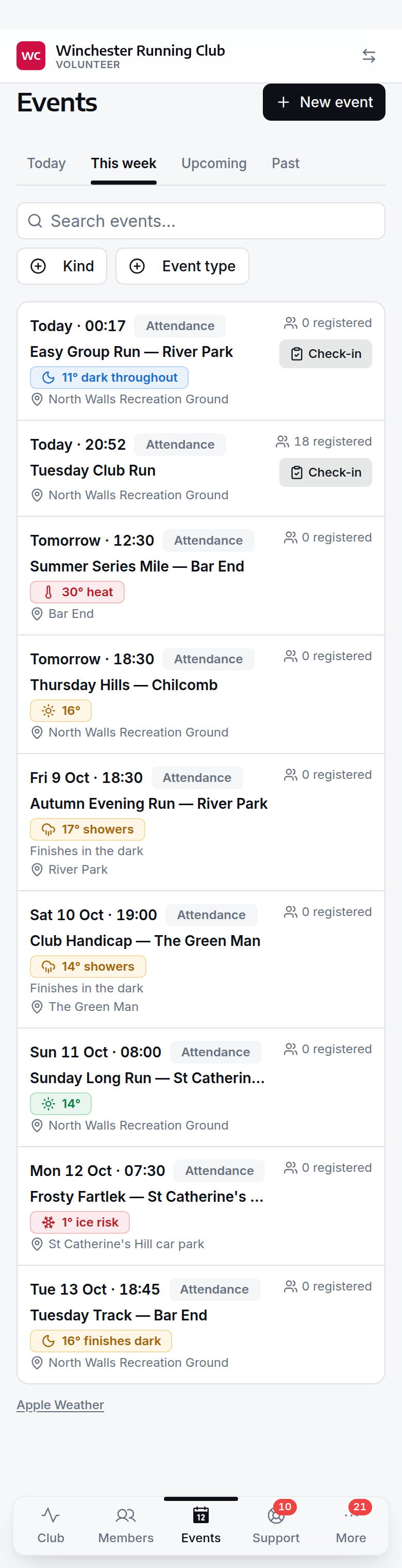
That week view is there for three jobs.
- Kit and safety messages. A run that starts in daylight and finishes in the dark is the autumn case worth writing to members about. A weather app cannot tell you when it happens, because it does not know when your run ends.
- Session planning. A coach choosing between intervals and a steady run on a muggy Thursday has the heat reading in front of them.
- A record of the reason. If the committee moves a session, you can say what the conditions were forecast to be and whose standard they were banded against.
The console never tells you what to do. Nothing on it says a session should be reviewed, moved or cancelled, and nothing changes an event's status on its own. Setting an event to Cancelled and telling members is a person's job, every time — see Events → After the event.
Severe weather warnings
Where the Met Office has a warning out covering the venue, it appears on the event above everything else we show, in their words, with a link through to the warning in full.
We cannot edit, shorten or hide a warning, and our own reading of the conditions sits underneath it.
A warning is issued for an area over a period, so one can be in force while the two hours your club is out look fine. The warning tells you what the day may do. Our reading tells you what your window is expected to do. A run leader wants both.
Reading the conditions after the event
Once an event has happened, its conditions stop changing and stay on the event as part of its record. A result or a club record then carries the conditions it was set in.
The panel says which of two things it is showing.
- Forecast at the time — the last forecast before the event started. Always available.
- Recorded on the day — what was actually observed. It replaces the forecast within a day of the event, where we can get it.
Past seasons cannot be filled in. We record conditions from the moment your club is switched on, so an event that ran last winter has nothing against it and never will.
What members see
On an event, a member gets a short verdict in plain words, the figures behind it, and a row of things worth bringing: a headtorch, hi-vis, gloves, a waterproof, trail shoes, sun cream, and an inhaler or an antihistamine where air quality or pollen are high. On a list of events, the same reading is one small chip, so a member scanning their diary sees the cold Tuesday without opening it.
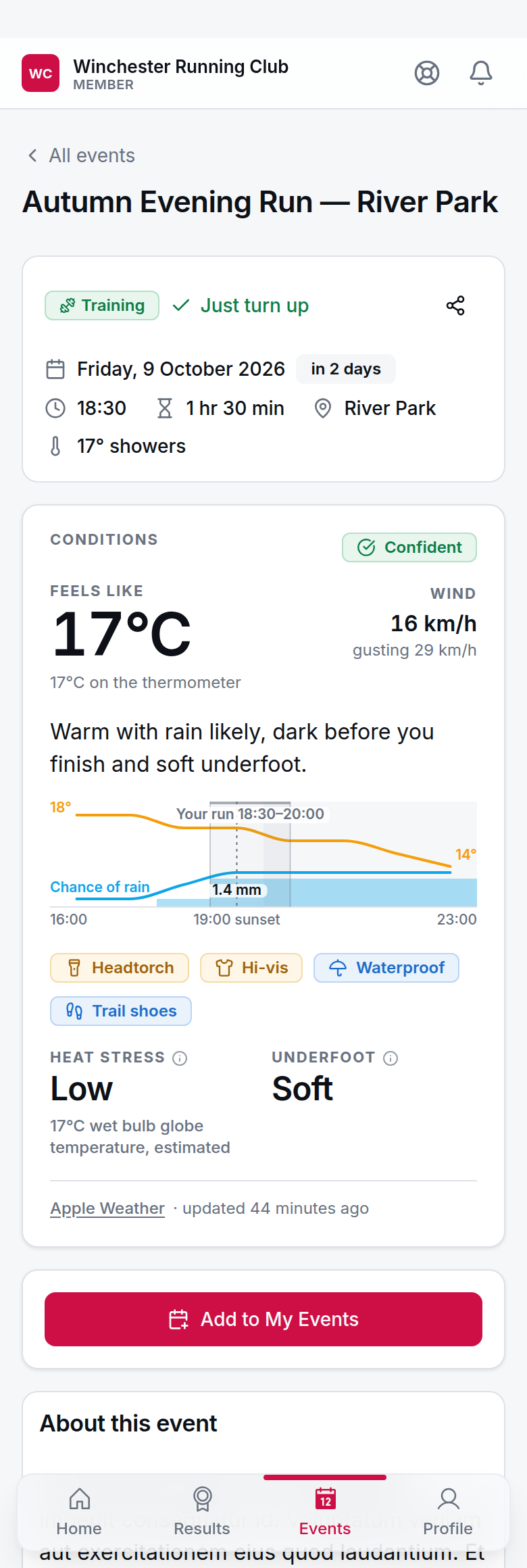
Members are told that a forecast can change, that the kit suggestions are prompts rather than the club's kit rules, and that whether a session runs is the club's decision. They read this in the help library, in three articles: What does the weather on my event mean?, Why is my run showing a headtorch? and Why is there no weather on my event?
Settings
| Setting | What it controls | Default | Where |
|---|---|---|---|
| Weather on events | Whether any of this appears, for the whole club | Off while the feature is in beta | We switch it on with you — ask us |
| The event's location | Which place the forecast is for. No location, no forecast | None until you set one | Events → Event Configuration → Locations |
| The course surface | Whether ground conditions appear. Trail, cross country and mixed courses only | None until you set one | Events → Event Configuration → Courses |
| The event's start and end time | The window everything is forecast for | Set on the event | The event itself |
Troubleshooting
An event a fortnight away shows no weather
That is the feature working. Forecasts start about a week out, so an event further off shows nothing at all. Look again nearer the time.
An event next week shows nothing at all
Check the event has a location with a pin on the map, rather than only a name in the description. A location that was typed as free text has no coordinates, so there is nowhere to forecast for. Fix the location and the conditions appear on their own.
A race shows conditions but no going
Ground conditions need a course whose surface is trail, cross country or mixed. A road or track event never shows going.
The forecast looks old
Where a refresh has not worked, the last forecast we had keeps showing, labelled with the time it was from, rather than the panel going blank. If the time shown is more than a day old on an event that is close, tell us.
The heat reading looks high for a mild evening
Heat stress combines temperature and humidity, so a warm muggy evening bands higher than a hotter dry one. See Where the numbers come from.
A member is asking whether tonight is cancelled
Nothing on the event answers that. Whether a session runs is your club's decision. Set the event to Cancelled if it is off, and message members — cancelling does not email anyone by itself.