
Appearance
Getting your members in
The first real question a new club asks is "how do we get everybody in?" If your club is affiliated to England Athletics, the answer is almost always: import your England Athletics roster. It is the cleanest list of who is in your club that most clubs have, and it is the one list nobody has to type.
It is one of several ways a club arrives, and most clubs use more than one. Moving your club to RunClub HQ is the map: what comes across from a spreadsheet, another membership system, GoCardless or an old website, who does each part, and when it happens.
Who can do this?
Finding your club in England Athletics is a settings change, so it is for your club's Club Admin. Running the import and working the review queue afterwards is for a Club Admin or Membership Manager. During onboarding we usually do both for you from our side.
Why we start with England Athletics
England Athletics holds a roster of the athletes affiliated to your club, and it will tell us each one's name, date of birth and URN. That is enough to create a member record for everybody, with their registration history already attached — so when a member later signs in, they claim the record we already have rather than creating a second one.
What England Athletics will not give us is email addresses. It does not share them with clubs, and neither do we invent them. So imported people arrive as prospects with no login, and nobody can be contacted until you or they supply an address. That is the normal starting state, and it is covered in Running a pilot → Step 5.
What the import brings in
| Comes across | Does not come across |
|---|---|
| First name, last name | Email address |
| Date of birth | Phone number, postal address |
| England Athletics URN | Emergency contacts, medical information |
| First-claim or second-claim status | Payment history, membership fees |
Nothing is sent to anybody. An import creates records; it does not email your club.
Prospects don't use up your pilot logins
Your pilot's login limit (usually 25) counts logins, not records. You can import a roster of four hundred people and still have all twenty-five places free.
The test we apply: a current competitive registration
Here is the honest part, and the reason the import is not simply "create everybody".
England Athletics never takes a resigned member off a club's roster. There is no field in the data that says somebody left. A runner who resigned in 2019 sits in the same list as one who raced last Saturday, and if we imported the whole roster you would start your club's life on RunClub HQ with a membership list full of people who are not members.
So the import applies one test to anybody it cannot already match to a member you have:
Does England Athletics show a current competitive registration with your club?
- Yes → the athlete is created as a prospect.
- No, for any reason → the athlete is held for your review instead, with the reason.
Nobody is thrown away and nobody is silently added. The people England Athletics can vouch for come in; the rest wait for the one person who actually knows — you.
About the three-month grace period
England Athletics keeps everyone from last season on the roster for about three months after renewals open, so a lapsed member still shows as registered in that window. We avoid that by asking England Athletics what each athlete's registration will be three months from now; anyone who has not renewed by then is held for your review rather than imported as a member.
The date we asked about is shown in the import preview and recorded on every held athlete, so you can always see which question was answered.
Find your club first
Before anything can be imported we need to know which England Athletics club you are. You do not need to know a club number — nobody does, and England Athletics does not publish them.
- Go to Settings → Branding → Club Information.
- In England Athletics Club, start typing your club's name — or the name of your town, if you are not sure what your club is registered as.
- Pick your club from the list. It shows each club's name and where it is, so the several sets of Harriers in different counties are easy to tell apart.
- Save. Import your roster appears next to the field and takes you straight to the import.
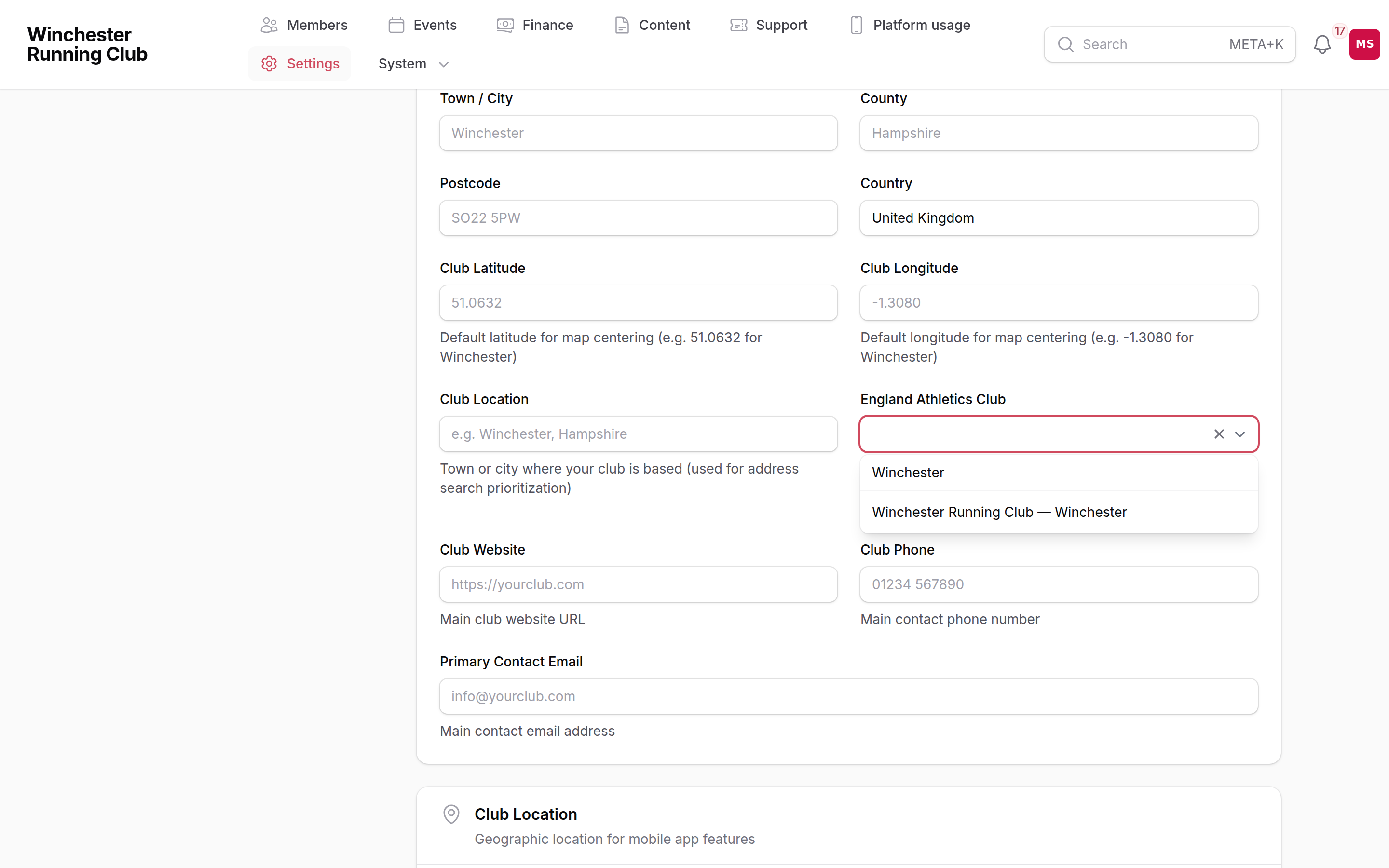
If the search finds nothing
Try a shorter search — "Andover" rather than "Andover Athletic Club" — and try your town. If your club still isn't there, it may not be affiliated to England Athletics, or England Athletics may hold it under a name you would not recognise. Ask us and we will look.
If the search says England Athletics is unavailable, it is their end, not yours. Try again in a few minutes, or tell us and we will set the club for you.
Running the import
- Go to Members → EA Review in your admin panel.
- Choose Import from England Athletics.
- Read the preview. It tells you how many athletes are on the roster, how many already match members you have, how many would be created as prospects, and how many would be held for review and why. Nothing has been written at this point.
- Choose Run the import. It runs in the background — give it a minute, then look at Members → All Members and at the review queue.
You can run it again whenever you like; it never creates the same person twice. It also runs by itself every night, so athletes who register with England Athletics during the season turn up without anybody asking.
If the button isn't there
The import only appears once your club has been matched to its England Athletics club. Go back to Find your club first — it takes a moment and you can do it yourself.
Working the review queue
Everyone the import held is listed under Review Items on the same page, with the reason:
| Reason | What it means | What usually to do |
|---|---|---|
| No current registration | England Athletics shows no competitive registration once the grace period has passed. Covers members who lapsed, members who left years ago, and members who only ever held non-competitive club membership. | Dismiss the ones who have gone. Create the ones who are still yours. |
| Registration status unclear | England Athletics returned something we could not read. | Create them if you recognise the name; otherwise leave it and it will re-check on the next sync. |
| Claimed by another club | England Athletics does not show your club as their first or second claim. | Usually dismiss — they belong to someone else. |
Two answers, on each row:
- Create as prospect — makes exactly the record the import would have made: name, date of birth, URN, no email, no login.
- Dismiss — takes them off the list. A dismissed athlete is never offered again, even if England Athletics later shows them as registered, so use it for people who have genuinely left. If you dismiss somebody by mistake, you can still add them by hand from Members → All Members → Add Prospect.
You do not have to clear the queue before doing anything else. It is a list of open questions, not a blocker.
Second-claim athletes
An athlete whose first claim is another club and whose second claim is yours is a real member of your club, and the import treats them like anybody else: England Athletics shows them as competitively registered, so they come in as a prospect.
What is different is money. A second-claim member's England Athletics registration is paid by their first-claim club, so you must not charge them an England Athletics fee. When you set up their membership, leave the affiliation fee blank. RunClub HQ tracks the second-claim relationship separately and will not ask England Athletics for a registration you do not owe.
If a second-claim member's first-claim club is slow to renew them, they will show up in the review queue as Second Claim Not Registered. That is a nudge to chase the other club, not a reason to remove them.
What happens to a prospect who never joins
Nothing bad. An imported prospect who does not go on to take out a membership stops counting as a live prospect after about 90 days — the club-health figures stop treating them as somebody you are still converting — but the record stays exactly where it is, with their URN and history intact. If they come back in two years, the record is waiting for them. See Club Health → Ageing out, and archiving.
If your club isn't affiliated to England Athletics
There is no self-service spreadsheet importer, and we are not going to pretend otherwise. What there is:
- Send us what you have, during onboarding. A spreadsheet, an export from your old membership system, a database backup — we load it and check it with you before you sign in. This is part of setting your club up and it is our job, not yours. See From a spreadsheet and From another membership platform.
- A WordPress club site. If your club runs on WordPress, there is a full migration path — members, events, records, payments, messages, documents, news posts and pages. See From WordPress.
- Direct Debits you already collect. If your members already pay you through your club's own GoCardless account, their mandates come across and nobody sets one up again. See From GoCardless.
- One person at a time. Members → All Members → Add Prospect adds a single prospect by hand. Fine for a handful of people; not a way to load a club.
- Let them add themselves. Members can sign up at your club's web address and complete the joining form. This is the right route for a club with no usable list — but read the warning in Running a pilot → Option B about exact name and date-of-birth matching first.
After the import
Once your roster is in:
- Check it looks right — the number of members, a handful of names and dates of birth. Dates of birth matter: they are what a member's own sign-up is matched against.
- Set up a season and membership types, so people have something to join. See Subscriptions.
- Record the members you already have in this season, so your first renewal campaign reaches them. Imported members arrive as prospects with no membership; see Recording the members you already have.
- Get your committee logging in — see Running a pilot → Step 5.
Getting help
If the numbers in the preview do not look like your club, stop and tell us before running it. Getting help covers how to reach us and what to include.
See also
- Match your club to England Athletics and import — recipe
- Moving your club to RunClub HQ — every way a club arrives, and who does each part