
Appearance
Club at a Glance
Club at a Glance is a read-only committee dashboard built for the volunteer console. It's the natural landing screen for a committee member: one glance at the numbers that matter, then a tap through to whatever needs attention.
Who can do this?
Viewing Club at a Glance: Club Admin, Membership Manager, Events Manager, Content Manager, Check-in Manager, Treasurer, or Viewer. It is read-only for every role — there's nothing to configure here.
Finding it
Open the volunteer console at /volunteer (or tap Club in the bottom tab bar / mobile app) — it's the first tab, and the default landing page for anyone who reaches the console with no other destination in mind.
The vitals grid
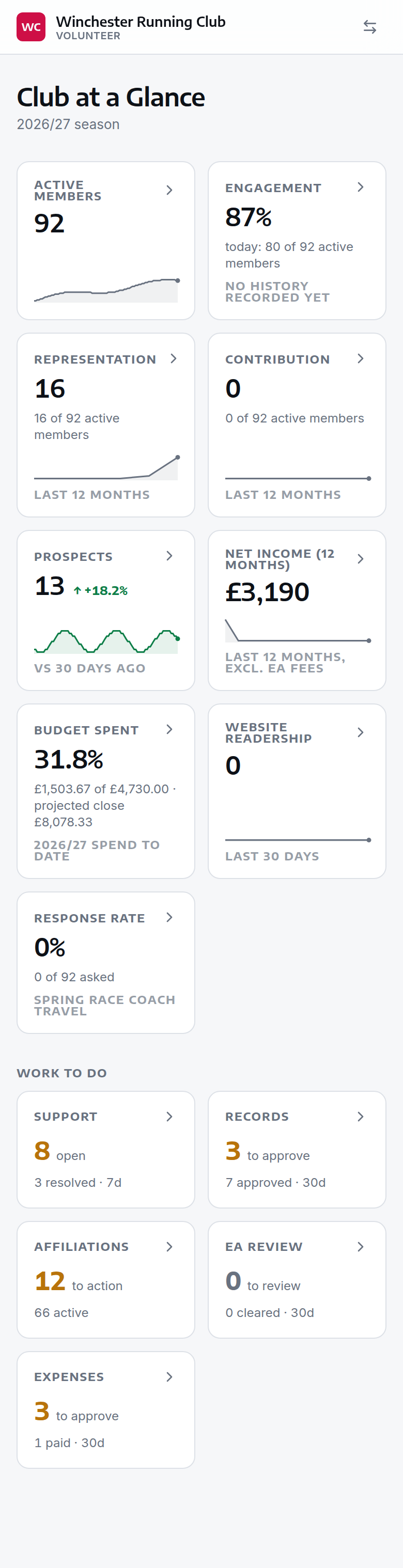
Seven cards summarise the club's current season at a glance, each with a trend sparkline and a comparison to a metric-appropriate baseline. An eighth — Response rate — joins them once you've published your first poll:
| Vital | What it shows | Compared against |
|---|---|---|
| Active members | Current active member count | Same date last year |
| Event attendance | Unique attendees at the last full week's training sessions | Trailing 6-week average |
| Representation | Members who've represented the club (races, fixtures) this calendar year | Same time last year |
| Volunteering | Members who've volunteered this calendar year | Same time last year |
| Prospects | People on the joining list — interested, not yet joined | 30 days ago |
| Revenue (season) | Income collected so far this membership season | Same point in last season |
| Budget spent | This financial year's spend so far, as a percentage of what's budgeted | The budget itself — there's no prior-period baseline |
| Website readership | Public site pageviews, trailing 30 days | The 30 days before that |
| Response rate | Your most recent poll's response rate, once you've run one | The poll's own audience — there's no trend to compare it against |
Budget spent only appears for anyone with a finance role, and only once the club has completed finance setup and has a budget for the current financial year — the same conditions the Budget page itself needs before its figures mean anything. The card shows the pounds spent against the pounds budgeted, and where the year's cash flow is projected to close (or, with no opening balance recorded, how much it's projected to move by), and drills straight into Budget.
Tap any card to drill into that domain — a dedicated page with a longer trend chart, headline stats, and (for Members, Event Attendance and Representation) a breakdown by demographics or by individual member.
Drilling into a domain
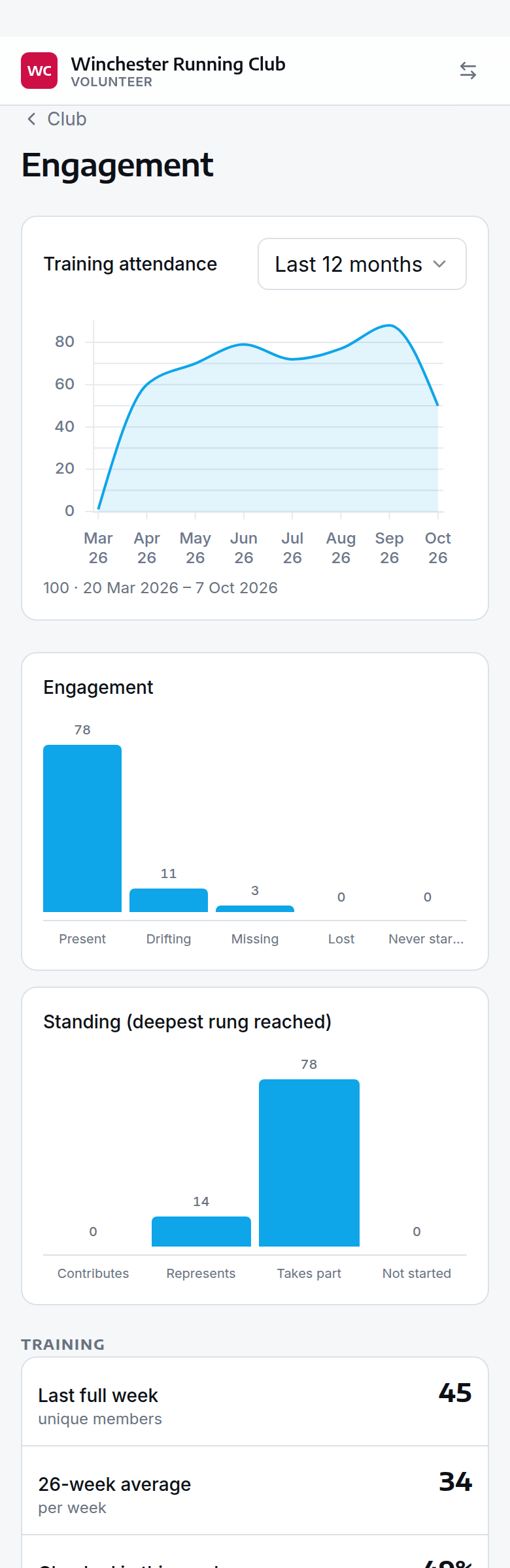
Each domain page leads with a trend chart — for Members it's a lookback picker (6/12/18/24/36 months); for Event Attendance and Representation it's a date-range picker so you can compare, say, this term against last term. Below that, a handful of headline stats (last full week, rolling average, engagement rate).
The Event Attendance and Representation domains also carry a By Member list — who has trained, raced, or volunteered most this season, and just as usefully, who hasn't been seen in a while. It's filterable by:
- Kind — All / Training / Volunteering / Representation / Other external
- Season vs. all time
- Engagement stage — never attended, quiet, dormant, long dormant, trains-but-never-races, fully active
- Flags — At risk, Do not renew
- Free-text member search
This is the tool for spotting members who've drifted away before they lapse, or for recognising your most active volunteers — without running a report in the admin panel.
The prospects drill-down
The Prospects vital opens the joining pipeline — everyone who has shown interest but hasn't joined yet, with enough detail to tell the person who came last Tuesday from the one who signed up in March and was never seen again.
Each row carries:
| Column | What it tells you |
|---|---|
| Person | Name, with a Junior badge for anyone under 18 |
| Stage | Where they've got to on the way in (see below) |
| Needs attention | Any conditions worth knowing about — see Needs attention |
| First seen | When the club first heard of them. If they registered later than that, the registration date shows underneath |
| Sessions | How many sessions they've actually attended |
| Last session | When they were last at something |
Five presets sit above the list — Everyone, Never attended, No subscription, Stopped attending, Ended — and you can filter by stage, by condition, by age (junior/senior/veteran), and by when they were first seen.
Stages
A stage says where somebody has reached, in journey order:
| Stage | Meaning |
|---|---|
| Registering | Part-way through the registration form |
| Attended, not registered | Came to a session, never registered. The club holds only what the kiosk captured |
| Not yet attended | Registered, no sessions attended |
| Trialling | Attending, with free trial sessions left |
| Trials used up | Free trial sessions used up, no subscription started |
| Subscribing | Part-way through subscribing |
| Awaiting payment | Subscription submitted, payment not settled |
| Awaiting EA | Paid, waiting on England Athletics |
| Joined | Through — a member |
Needs attention
Separately from the stage, a prospect can carry one or more conditions. A stage says where somebody is; a condition says they've been there longer than they should have — "Trialling" is healthy on Tuesday and worth a look five weeks later.
| Condition | Raised when |
|---|---|
| No subscription started | Free trials used up, no subscription started |
| Stopped attending | Attended at least once, nothing for 21 days |
| Never attended | Registered over 14 days ago, no sessions attended |
| Registration unfinished | Checked in at a session, registration never completed |
| Payment outstanding | Subscription submitted, payment not settled |
These state a condition and stop there — they don't tell you what to do about it. The same fact means "ring her" at one club and "she'll come when she's ready" at another, and that call is the club's.
The prospect record
Tapping a row opens a page built for this one question — not the full member profile. It carries the person's contact details and the usual call/email/message buttons, a journey track showing which steps they've completed (enquired, registered, first session, trial sessions, subscribed — with registration marked skipped for someone who walked in at the door), anything needing attention, the key facts, their activity timeline, and space for notes.
The activity timeline here includes the joining steps themselves alongside check-ins and results, so the sign-up and the sessions read as one story.
Ageing out, and archiving
Somebody who came once and was never seen again shouldn't sit on the joining list forever. After a period of no contact — 90 days by default — their prospect period ends automatically overnight and they drop off the live list.
You can also archive a prospect yourself from their record, with a note, when you know they aren't coming.
Two things are worth being clear about:
- Ending a prospect period is not deleting anybody. They were genuinely a prospect from first contact until they aged out or were archived, and every count they were part of stays true. The Ended preset shows them, with the date and the reason.
- Somebody who comes back is put back on the list automatically — a check-in is enough.
- A half-finished sign-up gets closed at the same time. Someone who starts the joining form and never comes back leaves it sitting open. On the same schedule and the same 90 days, that form is marked abandoned and stops cluttering the pipeline. If they turn out to have joined some other way — at a session, or you entered them yourself — the leftover form is marked superseded rather than abandoned, because that sign-up did finish, just not through that form. Either way it is recorded in the club's history, so you can see what was closed and when. A sign-up still waiting on England Athletics is never closed, however long it waits: that one is with EA, not with the member.
The period is dated to their last activity plus the window, not to the night the job happened to run, so the history reads correctly however long it's been since the club started using this.
Changing the window
The 90 days is a club setting — Settings → Registration → Prospects Age Out After in the /admin panel. Anything from 30 to 730 days. A club that runs a long winter break might reasonably want more.
Work to do
Below the vitals, a Work to do section surfaces the club's operational queues in one place, each showing an outstanding count and a recent-completions figure:
- Support — open tickets vs. resolved in the last 7 days
- Records — pending record claims vs. approved in the last 30 days
- Affiliations — England Athletics registrations/payments needing action vs. active affiliations this season
- EA review — data-integrity items the nightly England Athletics sync has raised vs. items cleared in the last 30 days. These are things the sync noticed and could not decide for itself: a date of birth that doesn't match EA's, a near-match on a name, somebody on the EA roster who has resigned here. They are a separate queue from Affiliations and sit on their own tab, which is why they get their own card — a mismatch left unread just gets raised again the next night, and the night after that.
- Expenses — expense claims awaiting a decision vs. claims paid in the last 30 days. Only shown to anyone with a finance role.
Each card only appears if you can open what it points at — the same roles that already work that queue: Support roles for Support, Records roles for Records, Membership Manager for Affiliations and EA review, Treasurer for Expenses. A Viewer with no support access sees the vitals but no Support card: a count you can't act on is worse than no count. Tapping a card jumps straight into that section's queue, on the tab holding the outstanding items.
How the numbers are calculated
The dashboard makes judgement calls — what counts as "attendance", when someone becomes "quiet" rather than just having a slow week — and those calls are worth knowing before you act on them.
The vitals, precisely
- Active members — a live count of members currently in
activestatus. Compared against the same date one year ago (from the club's daily history, once the club has a year of it — otherwise no comparison is shown). - Event attendance — unique members checked in to a training-type event in the last full ISO week (Monday–Sunday; the current, still-in-progress week is excluded). This is narrower than "attendance" everywhere else on the dashboard: it counts a scanned/logged check-in specifically, and only at training sessions — not races, external events, or volunteer-only fixtures. Compared against the average of the 6 complete weeks before that.
- Representation — members with at least one result (a finishing position or time) at a fixture belonging to a representative-nature competition — i.e. actually raced for the club at something like a league, relay or county fixture. Compared against the same calendar year, one year ago. A "coverage" figure alongside it is representation ÷ currently-active members.
- Volunteering — members who took a volunteer role (marshal, timekeeper, etc.) at an attended event this calendar year, counted once per person regardless of how many fixtures they helped at. Compared against the same calendar year, one year ago.
- Prospects — a live count of people currently on the joining list: members in
prospectstatus whose prospect period is still open. Somebody who went quiet long enough to age out (90 days by default) has ended and stops being counted here, which is what keeps this number from drifting upwards forever. Compared against 30 days ago. See The prospects drill-down for the pipeline behind it. - Revenue (season) — the sum of income collected from the start of the current membership season to today (only shown once a season is marked current). Compared against the same number of days into last season. For anyone with a finance role this card drills into the full Finances report — season-attributed income, collection states, fees, and the England Athletics position — instead of the summary revenue view.
- Budget spent — this financial year's spend so far against the year's expense lines, as a percentage of what's budgeted for them, read from the same actuals as the Budget page. Shown only to a finance-role holder, and only once the club has a budget for the current financial year — a club with nothing budgeted yet has nothing true to show a percentage of.
- Website readership — total pageviews across the public site over the last 30 complete days (today is excluded, since overnight processing means today's figure would always look artificially low). Compared against the 30 days before that. Only counts views of pages, posts, events and documents that resolve to a specific record — it undercounts against a raw hit counter, and console/member-app activity isn't included at all.
- Response rate — the response rate of the most recently published poll, out of the members it was asked of. There's no trend here: it's read against that one poll's own audience, not a baseline from a previous period. The card doesn't appear at all until your club has published its first poll. See Polls.
A change under 2% is shown as "steady" rather than up or down, on every vital that has a comparison — small week-to-week noise doesn't get dressed up as a trend. Budget spent has no comparison to shift on: the budget itself is the yardstick, not a prior period, so it never shows a direction.
Participation kinds: Training, Volunteering, Representation, Other external
The By Member list and a member's own participation history both classify every attended session into exactly one of five kinds, checked in this order — the first match wins, because a session can genuinely be more than one thing (a marshal at a league fixture is both "training-adjacent" and volunteering):
- Volunteering — a volunteer role was recorded, regardless of anything else about the session
- Representation — a result was recorded at a representative-nature fixture
- Training — the event is flagged as a training session
- Other external — an event the club didn't run itself (e.g. a member's own race entry logged for the record)
- (uncategorised — rare, not offered as its own filter)
Engagement stages
Every active member is placed into one stage, most specific first:
| Stage | Meaning |
|---|---|
| Never attended | A member on paper who has never come to a session |
| Quiet | Come back later than their own usual gap suggests — see below. Only possible in the first 30 days of absence |
| Dormant | Away 30–90 days, regardless of how often they used to attend |
| Long dormant | Away more than 90 days |
| Trains, never races | Attends regularly but has never represented the club at a fixture |
| Fully active | Attending and has represented the club this calendar year |
"Quiet" is judged against the member's own rhythm, not a fixed rule. The system looks at the typical gap between that member's own sessions over roughly the last year (the median gap, chosen specifically so one outlier — an injury, a holiday — doesn't quietly exempt them from ever showing as Quiet), then flags them once they're 50% past their own typical gap. A weekly attender (a 7-day typical gap) shows Quiet after about 10–11 days away; someone who normally comes monthly isn't Quiet until roughly 6 weeks have passed. Past 30 days away, personal rhythm stops mattering — everyone is Dormant, and past 90, Long Dormant, on the same flat clock regardless of how often they used to come. A member with fewer than two recorded sessions has no "typical gap" to measure against, so they can't be flagged Quiet — only Dormant or Long Dormant once they cross those flat thresholds.
Attendance for these purposes includes training, racing, and volunteering with a role — any of the three keeps the clock reset. Only representing the club (a result at a representative fixture) is what separates "Trains, never races" from "Fully active".
What it doesn't do
The dashboard has no write actions of its own — everything here is analytics and navigation. To act on what you see, follow a card through to Support, Club Records, or the Affiliations queue, or to the full /admin panel for anything the volunteer console doesn't cover.