
Appearance
Write a help article for your club
RunClub HQ writes and maintains a platform help library, but some answers only your club can give — your fees, your deadlines, your refund policy, whether a junior needs a parent present. This recipe covers replacing one of our articles with your own version, and writing one from nothing.
Who: Club Admin or Content Manager. Where: the admin panel, Support → Help articles. Takes: about 10 minutes.
Before you start
Decide which you need:
| Situation | Do this |
|---|---|
| One of our fourteen platform articles is close, but your club's answer differs (a fee, a deadline, a policy) | Write our own version on that article |
| A member keeps asking something none of the fourteen platform articles cover | Write an article from nothing |
Steps
Replacing a platform article
- Open Support → Help articles. You'll see the platform library and any of your club's own versions together, with Written by showing which is which.
- Find the platform article to replace and choose Write our own version. Confirm — this copies it into your club, where only you can now edit it.
- Edit the title, topic, and body to say what's actually true for your club.
Writing a new one
- Open Support → Help articles and choose Write an article.
- Give it a Title written as the question a member would actually type — "Do juniors need a parent at every session?" reads and searches better than a heading.
- Pick the Topic it belongs under — this decides which tile on the member's Help screen it sits in.
- Write the Body: four to seven short paragraphs, no headings, no list longer than six items, no images. Say what the member can do, what the club does for them, and how to reach you if it doesn't answer their question.
- Leave Published on to make it live straight away.
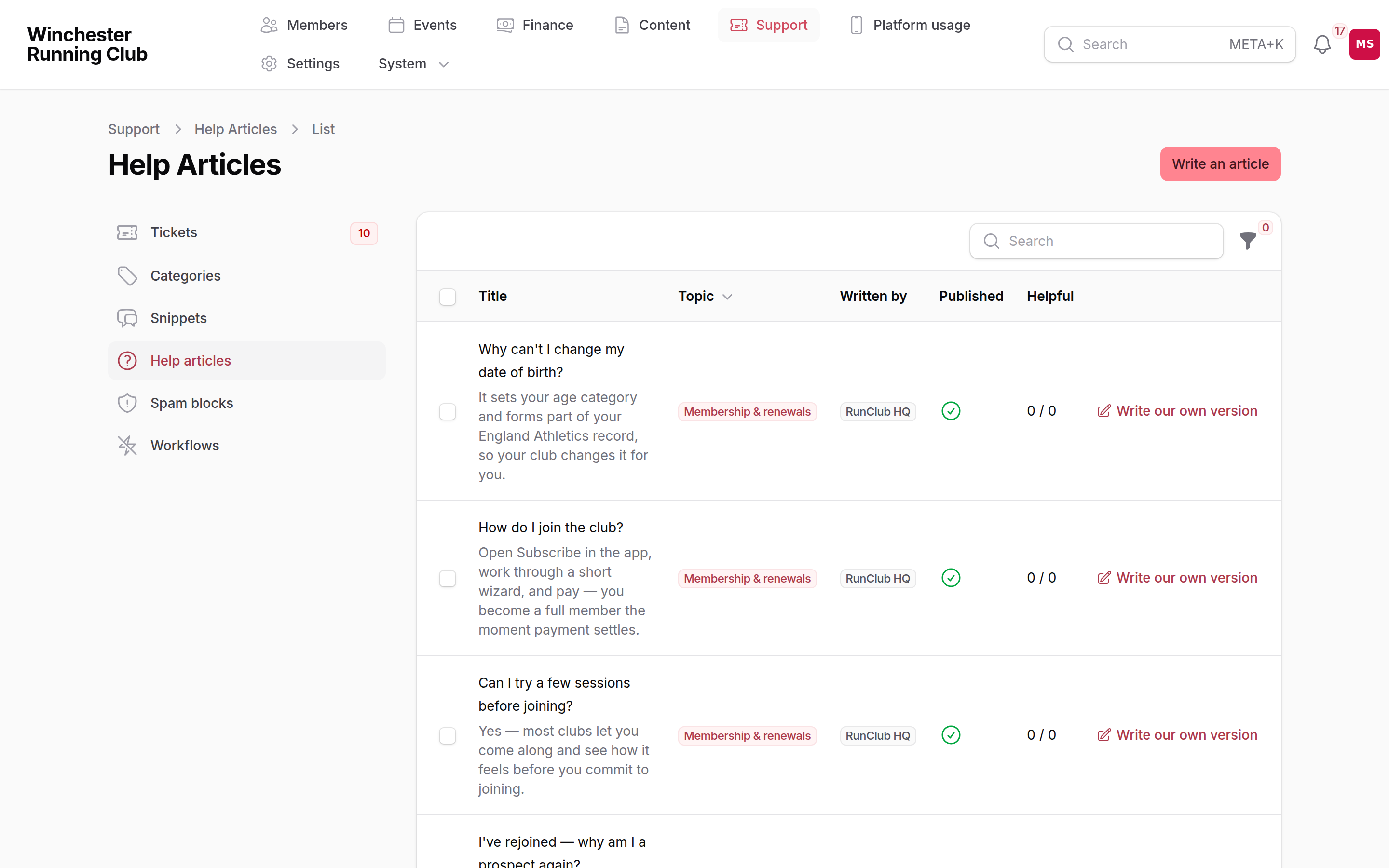
The platform library alongside a club's own overrides, with who wrote each one
What happens next
- A replaced article: from that moment your members read your version, and every Get help button in the app that used to point at ours finds yours automatically. Other clubs keep reading the platform one. Deleting your version later brings the platform original straight back.
- A new article: it appears under its topic tile and in search. It does not stand in for any platform article behind a Get help button — only an article created by Write our own version does that.
- Nothing is emailed. Members simply see the new or replaced answer the next time they open Help.
If it does not work
My override isn't showing to members
Check it's actually published — unpublishing hides your answer entirely rather than falling back to ours. And check it started life as Write our own version on the article it replaces, rather than a fresh one written from nothing; a fresh article answers its own topic tile, but won't stand in for the platform one behind a Get help button.
Write our own version isn't offered on an article
You've already got a version of that one — check your club's own articles list for it rather than creating a duplicate.
I want to see it the way a member does
Open Help in the member app yourself, or ask a committee member with member access to check. There's no admin preview separate from the live article.
See also
- The help library — what it is, how members find it, and conversations