
Appearance
Prospects and joining
Someone becomes a member in stages, not in one click: they hear about the club, try it, then join. RunClub HQ calls the in-between person a prospect — an account with no membership yet — and tracks them from the first contact through to Active, however they first showed up. This page covers the different ways someone starts that journey, the free trial, joining itself, and what to do with a prospect who's gone quiet.
Who can do this?
Adding a prospect by hand, quick registration, and archiving one who won't be coming back: Club Admin or Membership Manager. Importing from England Athletics: the same two roles — see Getting your members in. Viewing the joining pipeline on Club at a Glance: also Events Manager, Content Manager, Check-in Manager, Treasurer and Viewer. The trial and dormancy settings: Club Admin, from Settings → Registration. Anyone can register interest or check themselves in as a first-timer — no role needed.
The journey, in one picture
| Step | Where it happens |
|---|---|
| Hears about the club, or turns up | Word of mouth, a race, a poster |
| Registers interest | Your club's website |
| Becomes a prospect | Their own account, on your roster |
| Tries sessions, up to the trial limit | Check-in, at the session |
| Joins — subscribes to a membership | The member app |
| Active | A full member |
| (later) Leaves, then comes back | Rejoins from their dashboard |
Everyone passes through the same stages on the way in, whichever door they used to arrive. Club at a Glance tracks exactly where each person has got to.
Ways in
Register interest
The easiest way in is the one on your club's own website: a Register Interest CTA section, usually on the Join page, asking for nothing but an email address. See Your club website for adding or editing this section.
Someone who fills it in gets an email back to get started. It holds a link, and a six-digit code as well unless you have turned codes off in Settings → Authentication. There is no password to set. If they type a domain wrong (gmial.com for gmail.com), the form spots it and offers the correction before they submit.
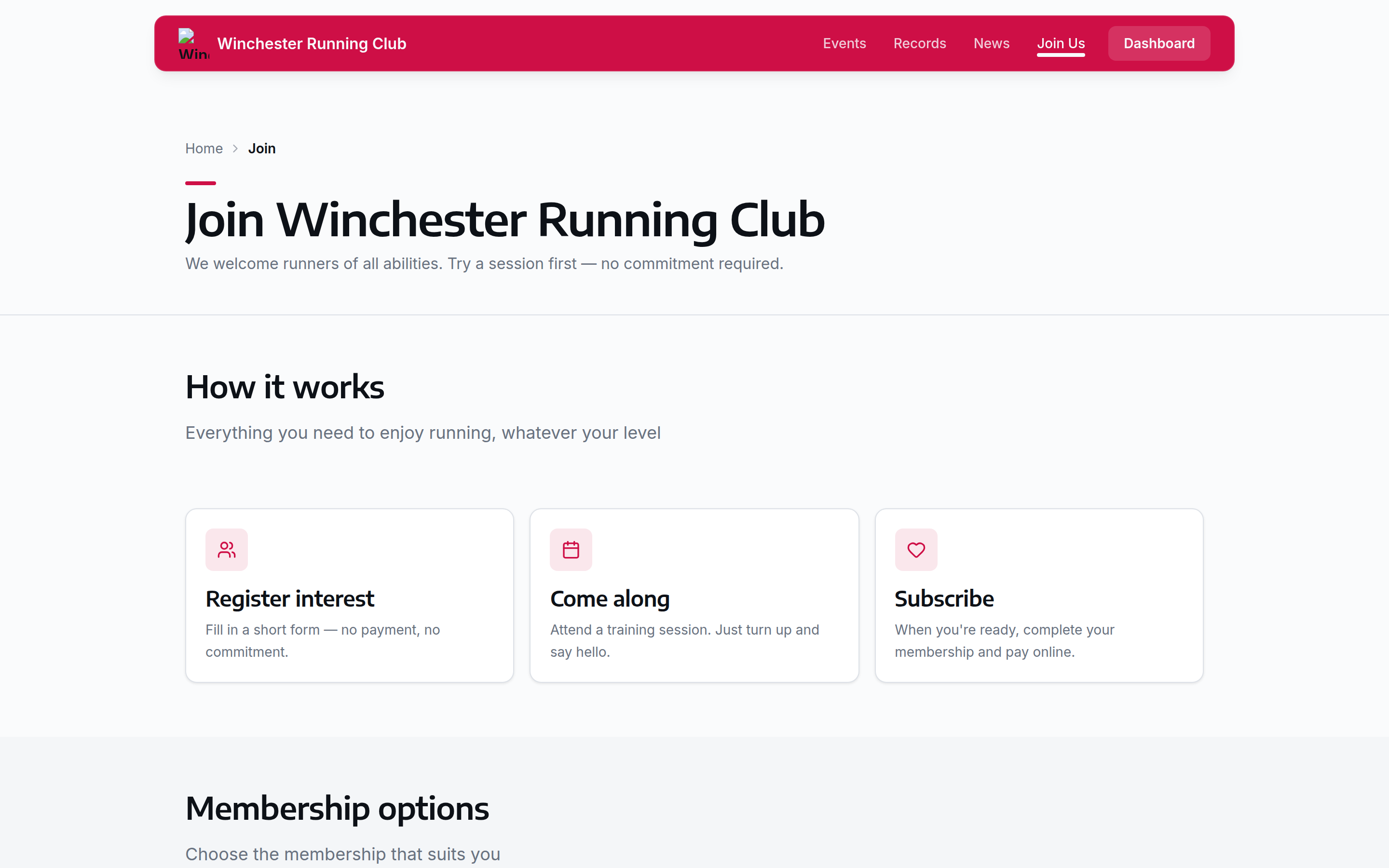
the join page — an email address is all it takes to start
From the sign-in page
Someone can also start from your sign-in page. Under the email box is New here? Create an account. It asks for an email address and sends the same email as Register Interest.
Signing in only works for an address that already has an account. Creating one is open to anyone, so that form asks the visitor to confirm they are a person. Members never see that check.
If someone types an address you have no account for into the sign-in box, the page still says to check their email, and nothing arrives. We do this on purpose. Telling them "no account here" would let anyone find out whether a person runs with your club.
So if a member says a sign-in email never came, check which address you hold for them. If they have never had an account, point them at Create an account.
Self-registration
Following the link from either of those two doors opens the registration wizard, five short steps:
- Welcome
- Registration Type — themselves, or someone else (a partner, a child)
- Personal Details
- Running Interests
- Agreements
They become a prospect on your roster the moment they get through Personal Details — before that, only their account exists, and nothing shows up on the roster or the pipeline yet.
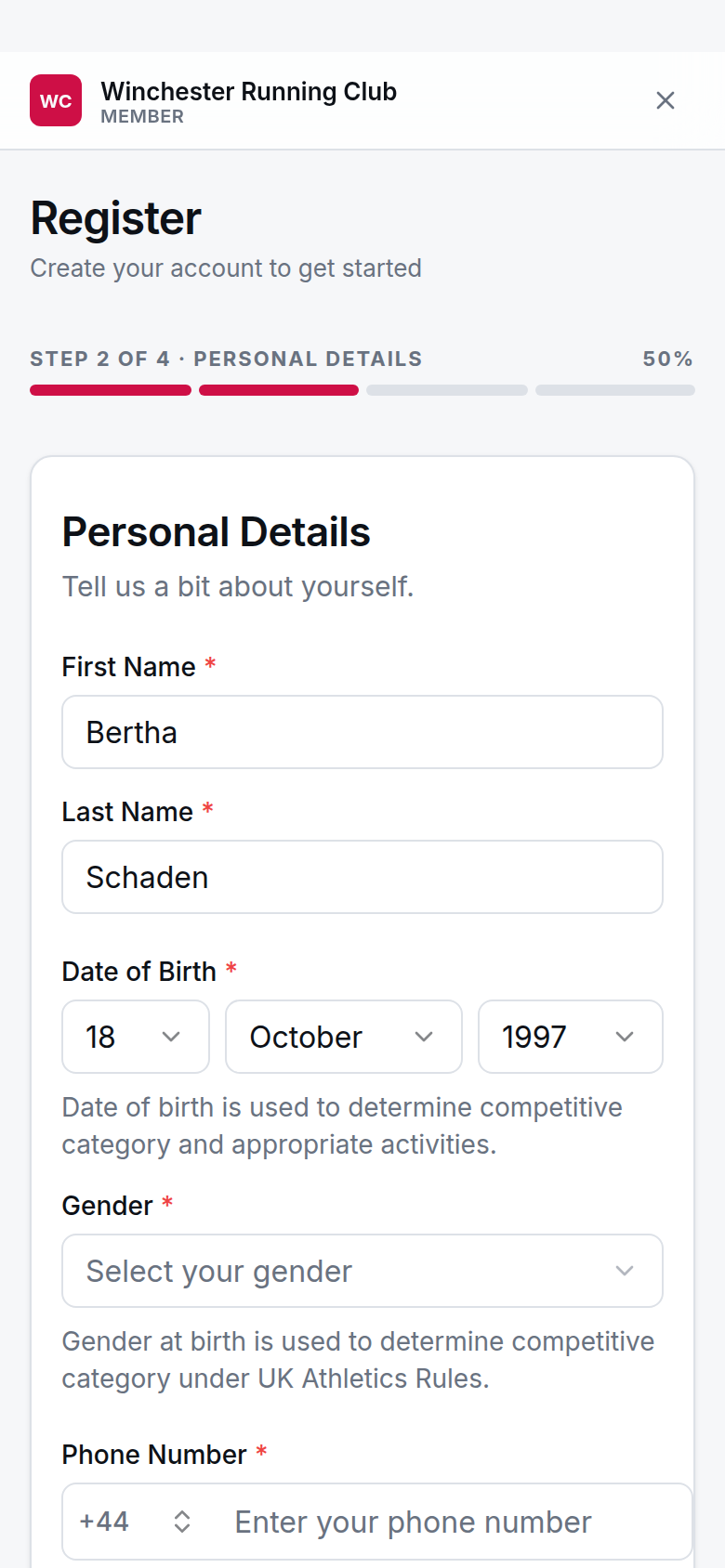
the registration wizard, part-way through
Checked in as a first-timer
Someone who just turns up at a session, with no email beforehand, can be added on the spot from the check-in desk — see Add a first-timer for the steps a volunteer takes. It creates them as a prospect and checks them in straight away, no payment or medical details needed at the door.
They get an email afterwards to finish the rest. Following it drops them into the same wizard as anyone else, minus the Welcome step — the kiosk already did that — but it still asks the registration-type question, because the person at the door might have been signing up their child rather than themselves.
Quick prospect registration
If you already have someone's name and email in front of you — after a race, on a call, from a paper form — you can add them yourself rather than waiting for them to register. This is the same Add Prospect action covered in Members and households → Add a member: give a name, email and date of birth if you have it, and they're created as a prospect and emailed to finish their own profile.
Imported from England Athletics
Bringing in your England Athletics roster (see Getting your members in) creates a member record for everyone England Athletics can vouch for. Once one of them is given a sign-in — the same Enable login covered in Members and households → Give a member a sign-in — following the link takes them into a shorter version of the wizard: no Welcome or Registration Type step, because who they are isn't a guess to confirm, it's England Athletics' own record of them. Their name and date of birth arrive locked, so they go straight to Running Interests and Agreements — the two things England Athletics doesn't tell us.
When you're not taking new members
Turn Accepting New Members off in Settings → Registration → Registration Policy. It is on until you turn it off.
That closes both ways in at once: the Register Interest section on your website, and Create an account on the sign-in page. Instead of a form, people see whatever you have written in Registration Closed Message.
Write something they can act on. "We reopen for the new season in September" tells someone when to come back. The default does not.
Existing members are not affected. They sign in as normal, renew as normal, and a lapsed or resigned member rejoins from inside the member app.
Turning this off does not stop the members you already have from subscribing. That depends on your seasons: a member can only subscribe to a season marked Current Season and Active — see Subscriptions and seasons.
The trial
Your club's Trial Events Limit — three sessions by default — is how long somebody can try the club before they're expected to join. RunClub HQ tracks it against every prospect: on Club at a Glance, a prospect who's used their free sessions and not started a subscription shows the No subscription started condition, so you know it's worth a word with them.
Be aware that right now this is a soft limit. Nothing at the check-in desk or in the member app currently stops someone attending past it or shows them a message about it — the Enforce Trial Limit toggle and the warning message text are both there in Settings → Registration, ready for when that catches up, but neither does anything yet. Today, going over the limit is something you notice and follow up on, not something the product enforces for you.
Joining
Ready to join, a prospect opens Subscribe in the member app — from their dashboard, or the prompt they see once their trial's used up. It's a longer wizard than registration, because this is where the club actually needs the detail:
- Your Details
- Runner Details
- England Athletics — if your club affiliates, this is where they register or confirm the URN already on file
- Emergency Contacts
- Medical Information
- Choose Membership
- Agreements
- Payment
Choose Membership only shows the types they're actually eligible for — by age, and by proof of student status where a type asks for it. See Subscriptions and seasons for how types and fees work, and Payments for what happens at the payment step. Once payment settles, they move from Prospect to Active automatically, and their subscription appears under Members → Subscriptions.
Dormancy
Somebody who came once and was never seen again shouldn't sit on your joining list forever. After 90 days by default with no contact of any kind — a session, a step of the form, a change of status — a prospect's period ends automatically overnight and they drop off the live list. Nothing is deleted, and anyone who comes back is put straight back on it. You can also archive a prospect yourself, with a note, the moment you know they aren't coming back.
The full mechanics — stages, the conditions that flag someone needing attention, and the difference between ending a prospect period and deleting a record — are covered on Club at a Glance → Ageing out, and archiving; this page only covers how someone gets onto that list in the first place.
Rejoining
A former member sees a non-dismissible Welcome Back card on their dashboard once there's no live renewal standing in the way — that's a Resigned or Transferred member, specifically. Its button reads Rejoin, followed by your club's name, and pressing it puts them back to Prospect and takes them straight into the Subscribe wizard above: re-confirming their consents, medical information and emergency contacts as part of the same journey, priced pro-rata from today. There's no separate rejoin form.
A Lapsed member is a different case — they still have a live renewal to pay, so they're in the renewal flow rather than this one. See Renewals for that. Rejoining and paying now happens in one visit to the wizard, rather than sending someone back and forth between a renewal page and a sign-up form.
The pipeline on Club at a Glance
Every prospect, whichever door they came in, shows up on Club at a Glance → the Prospects vital — one row per person, with the stage they've reached, anything needing your attention, and how many sessions they've actually been to. It's the one place to see your whole joining list at once, rather than checking the roster for anyone new.
Tapping a prospect opens their own record: contact details, a journey track showing which steps they've completed, and a running history of everything from their first enquiry to their most recent session.
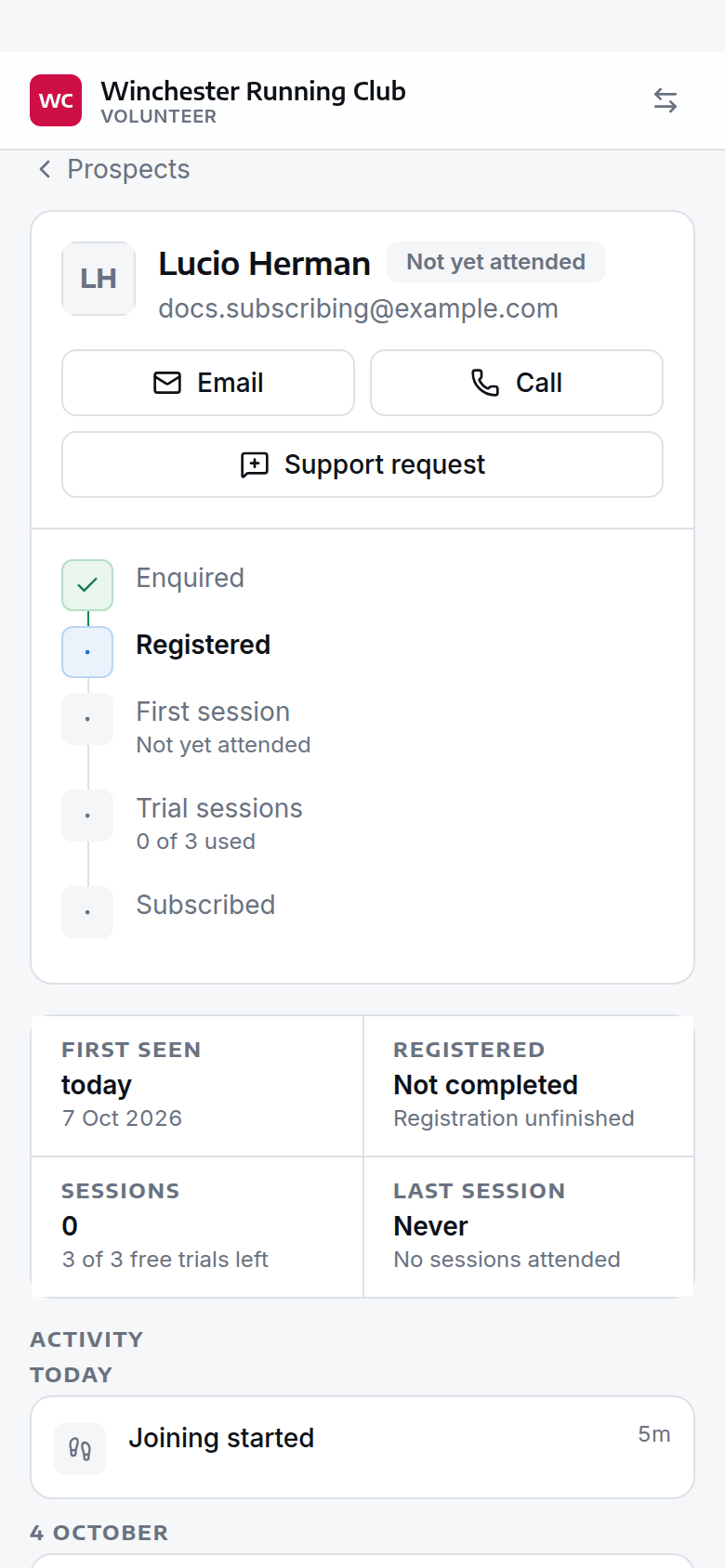
a prospect's record — the journey so far, and what's next
Settings
From Settings → Registration:
| Setting | What it controls | Default |
|---|---|---|
| Welcome Page Title | Title shown at the start of the registration wizard | Join Our Club |
| Welcome Message | Message shown on the wizard's first step | A default message |
| Registration Completion Message | Message shown once registration is finished | A default message |
| Minimum Age for Runners | Youngest age a parent or guardian can register a junior at | 7 |
| Minimum Age for Self-Registration | Below this age, someone must be registered by a parent or guardian | 18 |
| Trial Events Limit | Free sessions before a prospect is expected to subscribe | 3 |
| Enforce Trial Limit | Block event registration once the trial limit is reached (not yet enforced — see The trial) | Off |
| Trial Limit Warning Message | Message for a prospect approaching or at the trial limit (not yet shown anywhere) | A default message |
| Prospects Age Out After | Days without contact before a prospect drops off the joining list | 90 days |
| Accepting New Members | Whether anyone can create an account and start joining — see When you're not taking new members | On |
| Registration Closed Message | What a would-be member sees when you aren't taking anyone new | A default message |
Troubleshooting
Someone registered twice
If the same person ended up with two accounts — once through Register Interest and again at the check-in desk, say — use Merge duplicate rather than deleting either one by hand. See Members and households → Merge duplicate records.
A prospect can't check in
Check they've actually finished at least the Personal Details step of the wizard — someone who's only registered their interest has an account but no member record yet, so there's nothing on the roster for check-in to find. If they have a record, check their status: only Prospect, Active and Lapsed members can be checked in.
The join page shows no membership types
This is a Choose Membership problem, not a joining-page problem — nobody sees a type they're not eligible for, or one with no fee set for the current season. See Subscriptions and seasons → A member can't see the type they want for the full checklist.
They paid but are still a prospect
A member only moves from Prospect to Active once their payment has actually settled, not the moment they submit it — a Direct Debit in particular can take a few days. Check the payment's status before assuming something's gone wrong; see Payments for what each status means.
See also
- Members and households
- Club at a Glance
- Subscriptions and seasons
- Renewals
- Payments
- Check-in
- Getting your members in
- Activate a prospect by hand — for the exceptional case where a prospect needs activating without going through Subscribe