
Appearance
Activity log
Every meaningful thing that happens on your club — a member joining, a payment settling, a setting changed, a subscription cancelled — is written to one record: the Activity Log, under that name in the admin panel's top navigation. It's plain English, not a raw database dump, and it's the place to answer "who did that, and when?" without asking around.
Who can do this?
Nobody sees everything by default. You see the areas your own role already works — a Treasurer reads payments and expenses, not member notes or support tickets. Club Admin sees every area. See who sees what below, and Roles & Permissions.
How it works
The log writes itself — there's nothing to switch on, and nothing to configure. Every write to the club that's worth knowing about lands here on its own, the moment it happens. It's a record, not a working document: nobody edits or deletes a row, including a Club Admin, so an entry from a year ago reads exactly as it did the day it was written.
Reading an entry
Every row shows When, an Area badge, Who did it, and What happened — a plain sentence, not a code. A toggleable Record column names the specific member, event or invoice it's about, if there is one.
Filter by Area, by Who, or by a date range. Hide sign-ins and access trail is on by default: it keeps sign-ins, directory views and document downloads — real, but far too frequent to read as a feed — out of the way until you deliberately go looking for them.
The search box above the table matches What happened, and matches an admin's email under Who even though the column shows their name — useful if you know who to look for but not what they did.
Open any row for the full detail: the summary, when, who, the area, the record it's about, and a collapsed Details panel with the exact values recorded at the time — a change reads the same today as it did the day it happened.
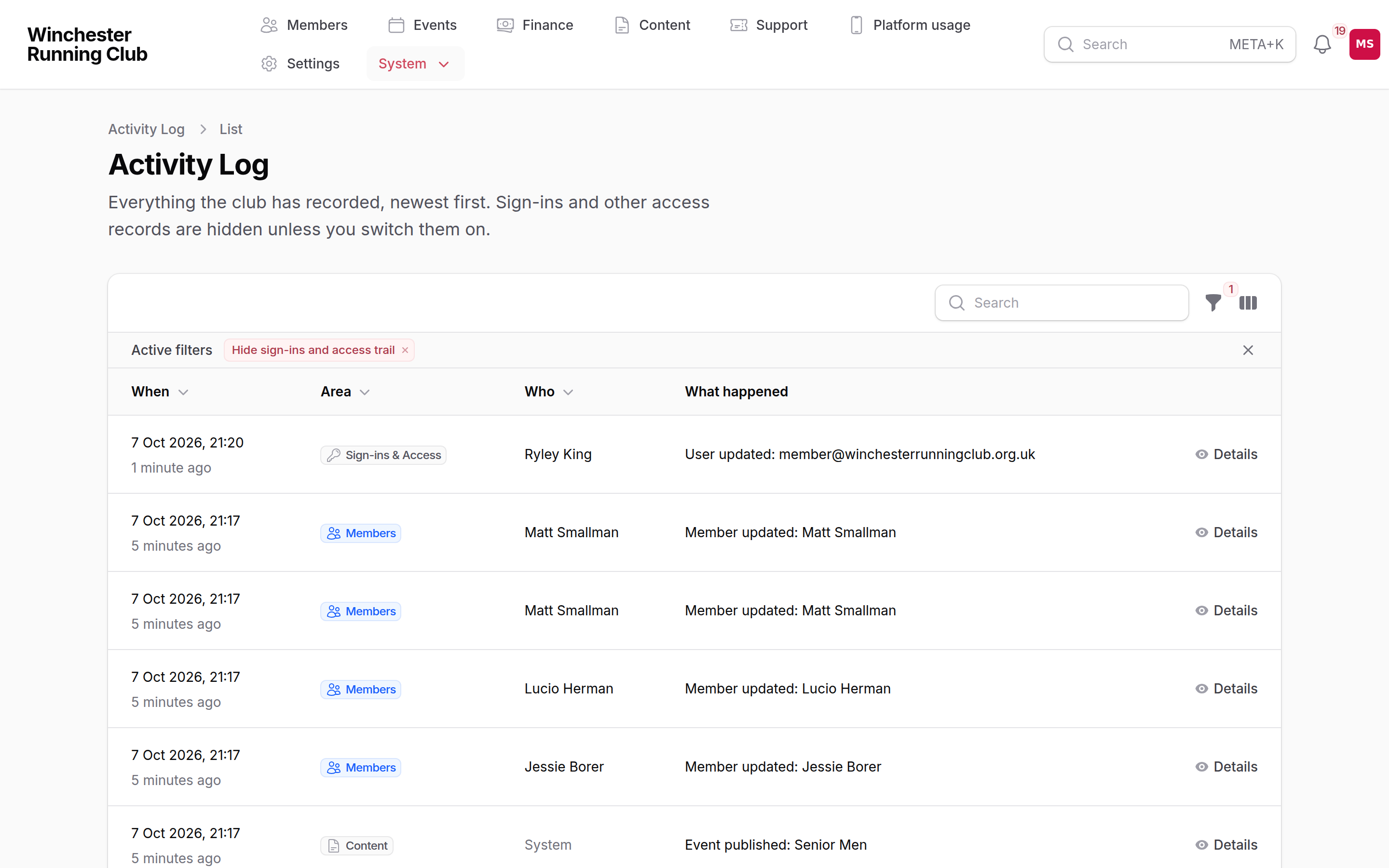
The Activity Log — filtered by area, with the access trail hidden
Who sees what
An area is visible exactly when the screen it records is visible — gaining access to Members gains you the Members history alongside it, automatically.
| Area | Covers | Who sees it |
|---|---|---|
| Members | Joins, profile edits, status changes, households | Club Admin, Membership Manager, Viewer |
| Payments | Payments, invoices, refunds | Club Admin, Treasurer, Viewer |
| Renewals | Renewal campaign activity | Club Admin, Treasurer, Viewer |
| Expenses | Expense claims | Club Admin, Treasurer, Viewer |
| Platform Billing | What the club pays RunClub HQ — not what members pay the club | Club Admin, Treasurer |
| Events | Events, entries, check-ins | Club Admin, Events Manager, Viewer, Check-in Manager |
| Results & Records | Results and club record claims | Club Admin, Membership Manager, Viewer, Records Manager, Results Reviewer |
| Support | Support ticket activity | Club Admin, Viewer |
| Content | Pages, posts, documents | Club Admin, Content Manager, Viewer |
| Messaging | Bulk email, mailing lists | Club Admin, Content Manager, Viewer |
| Polls | Poll activity | Club Admin, Content Manager, Viewer, Events Manager |
| Emergency & Medical Access | Reveals of emergency and medical information — see below | Club Admin, Welfare Officer |
| Sign-ins & Access | Sign-ins and directory look-ups | Club Admin |
The emergency access trail
A Welfare Officer's reveal of a member's emergency contacts or medical details leaves its own row here, under Emergency & Medical Access — visible from the same place you already look, rather than a separate log nobody remembers to check. Because a reveal is part of the access trail, it's hidden behind Hide sign-ins and access trail by default, the same as a sign-in.
The reason given for looking isn't shown here — that stays with the full record of the reveal itself, the Emergency Access Log, which only a Welfare Officer or Club Admin can open. See the Welfare officer playbook for how a reveal works and where that log lives.
Exports and data requests
There is no one-click export from the Activity Log itself, but you no longer have to assemble a member's data by hand.
If a member asks what the club holds about them, open their record from Members and choose Download their data. That produces one file for that member: a summary page they can read and the same information as spreadsheets. See Download your data.
A Club Admin can also take a copy of the whole club from Settings → Download your data, which is the better starting point when a request covers more than one person.
Retention
Rows are kept for a year and then removed automatically — there's no setting to change this today.
Troubleshooting
An area I'd expect to see isn't there
Areas follow your role, not a separate log permission. Ask your Club Admin to check what you're assigned, from Settings → Admin Users, or see who sees what above.
Sign-ins and access rows are missing
They're not missing — they're hidden. Switch off Hide sign-ins and access trail in the filters to bring them back.
I can't find a Welfare Officer's reveal
Switch off Hide sign-ins and access trail and filter to Emergency & Medical Access — it's there, just hidden by the same toggle as sign-ins. The reason given for the look is only in the Emergency Access Log itself; see the Welfare officer playbook.
I need everything the club holds about one member
There is no single export button for one member yet. See Exports and GDPR requests above for what to gather instead.
See also
- Your admin dashboard — the Recent Activity widget draws from this log
- Welfare officer playbook
- Consents
- Getting help